

Key Takeaways
Wi-Fi Signal
A Wi-Fi signal is a form of radio wave that carries data wirelessly between your router and connected devices. Routers transmit these waves outward in all directions, and devices like phones and laptops receive them to exchange information with the internet. Like all radio waves, Wi-Fi signals can be absorbed, reflected, or blocked by physical objects and competing radio sources.
Wi-Fi operates primarily on two radio frequency bands: 2.4 GHz and 5 GHz. The 2.4 GHz band travels farther but carries less data; the 5 GHz band is faster but has a shorter effective range.
How Routers Broadcast Data Through the Air
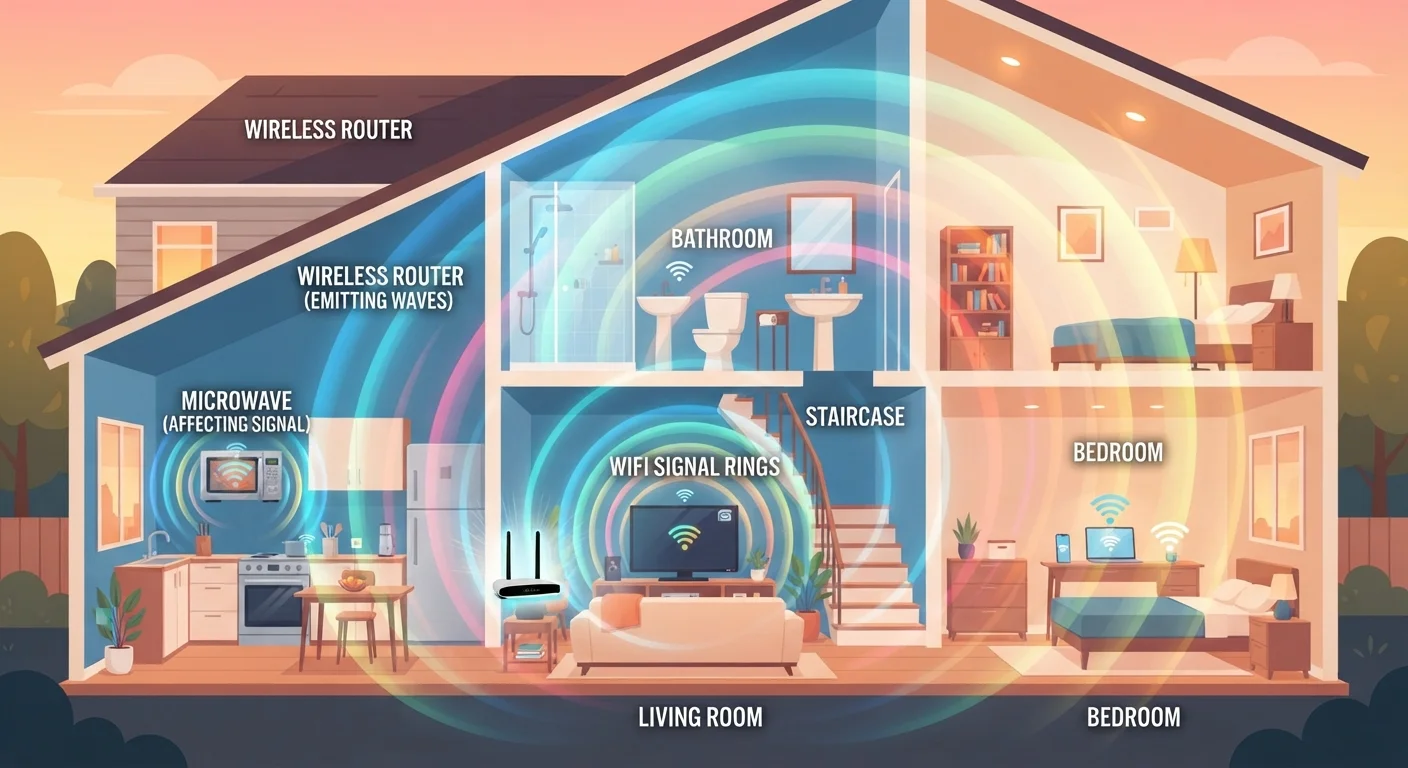
Your router works like a miniature radio station. It converts incoming internet data into radio waves, transmits those waves outward through antennas, and your devices pick them up and convert them back into usable data. This exchange happens dozens of times per second — invisibly and continuously.
Unlike AM or FM radio, Wi-Fi uses much higher frequencies designed to carry large volumes of data quickly. The trade-off is that higher-frequency signals don't travel as far and are more easily disrupted. That's the core physics tension every Wi-Fi network operates within.
For a broader look at how wireless technologies compare, see how Wi-Fi differs from Bluetooth — two systems that share the wireless world but are built for very different tasks.
2.4 GHz
Frequency shared by Wi-Fi and microwave ovens
This frequency overlap is why running a microwave near a router can disrupt a 2.4 GHz Wi-Fi connection.
~75%
Signal strength lost through a concrete wall
Industry estimates suggest a single dense concrete wall can reduce Wi-Fi signal strength by as much as 75%, depending on thickness and frequency.
5 GHz
Faster Wi-Fi band with shorter range
The 5 GHz band supports higher data throughput but is more susceptible to attenuation from walls and distance than 2.4 GHz.
Why Walls and Building Materials Weaken Your Signal
Every material a Wi-Fi signal passes through costs it some energy. The denser the material, the more signal is absorbed or reflected before reaching your device.
- Concrete and brick: These are among the most signal-blocking materials found in homes. A single exterior concrete wall can cut signal strength dramatically.
- Metal: Metal surfaces reflect radio waves rather than absorbing them, which can create dead zones on the far side of filing cabinets, appliances, or metal stud framing.
- Drywall and wood: Far more permeable — a standard interior wall has relatively little impact on a 2.4 GHz signal, though effect accumulates across multiple walls.
- Water: Water molecules absorb 2.4 GHz energy efficiently — a large fish tank or thick plumbing run between your router and device can noticeably degrade signal quality.
This is why homes with open floor plans often have better Wi-Fi coverage than those with many small rooms separated by thick walls.
Improve Coverage With Smarter Router Placement
Place your router in a central location, elevated above floor level, and away from metal appliances and thick masonry walls. Even moving a router from a corner to a central hallway shelf can meaningfully extend usable coverage throughout a home.
Interference: When Other Devices Compete for the Same Frequency
Wi-Fi doesn't operate in isolation. Several common household devices share the same radio frequency bands, and when they transmit simultaneously, they compete for the same airspace.
Microwave ovens are a well-known culprit. They're designed to heat food using 2.4 GHz electromagnetic energy, and they can leak enough signal to disrupt nearby Wi-Fi. Older cordless phones, baby monitors, and even some neighboring Wi-Fi networks can contribute to congestion on the same band.
The 5 GHz band exists partly to address this problem. It's less crowded because fewer legacy devices use it, but the trade-off is that it doesn't travel as far through obstacles. If your devices support it, connecting them to 5 GHz when they're near the router — and reserving 2.4 GHz for devices farther away — is a practical approach to reducing interference.
If your devices are frequently losing connection despite good signal strength, interference is a common underlying cause. Smart device disconnection issues often trace back to exactly these radio frequency conflicts.
Wi-Fi Channels Also Affect Interference
Within each frequency band, Wi-Fi operates on specific channels. In densely populated areas — apartments, for example — neighboring routers may be broadcasting on the same channel, adding to congestion. Many modern routers can automatically select the least-congested channel, or this can be adjusted manually through router settings.
Distance and Signal Degradation
Even in a completely empty room with no obstacles, Wi-Fi signal strength falls off with distance. Radio waves spread outward in all directions simultaneously — and as that energy disperses across a larger and larger sphere, the amount reaching any one point decreases. This is a fundamental property of wave propagation, not a flaw in your router.
In practical terms, a device 30 feet from the router receives a significantly weaker signal than one 10 feet away — and this degradation compounds when walls and interference are added. Router placement matters more than most people realize. Positioning a router centrally in a home, elevated off the floor, and away from large metal appliances maximizes how evenly signal energy is distributed.
Understanding how signal propagation works is part of the same physics picture as wireless energy transfer — different applications, but the same underlying electromagnetic principles at work.
“Radio frequency propagation in real-world environments is messy. Every reflection, absorption, and competing source changes how signal energy actually reaches a receiver — which is why lab speeds and real-world speeds rarely match.”
— Andrew S. Tanenbaum, Computer scientist and author of foundational texts on computer networks